


Member of Russell Bedford International, a global network of independent professional service firms.
Member of Russell Bedford International, a global network of independent professional service firms.


Accounting & Tax Specialist
We are all aware that it is common for a business to have employees and independent contractors performing their work. But there is a big question to ask yourself as a business executive – are we classifying our employees and independent contractors correctly? It is critical that businesses correctly determine this classification due to the following:
Following the release of the 2021 Independent Contractor Rule, in which the Department of Labor (DOL) provided guidance on the classification of independent contractors versus employees under the Fair Labor Standards Act (FLSA), misconceptions and room for inconsistencies with the law arose.
Effective March 11th, 2024, a new final rule regulation (RIN 1235-AA43) was released. This new rule revises the “economic reality test” that determines workers’ status under the FLSA. The main goal is to make sure workers are protected, classified properly, and that they receive the wages earned.
The new rule consists of a new economic reality test for employers to use to determine whether a worker should be treated as an employee or independent contractor. The test includes six factors, which increased from the five factors included in the previously released 2021 rule.
The following are the six factors to consider under current law.
With the newly updated final rule for independent contractors, it’s a good time to review your vendor relationships for proper reporting. Beyond compliance with the FLSA, employers should be certain the determination of an employee or independent contractor is consistent with IRS guidance.
We hope this information is helpful. If you’d like to discuss the new Act and its effect on your situation, please contact the experts at Cray Kaiser at (630) 953-4900. For more information on Tax Guidelines for Independent contractors, please visit our blog.
The Illinois Department of Revenue has issued an informational bulletin on the enforcement of the Illinois Secure Choice Savings Program Act (Secure Choice Program).
Under the Illinois Secure Choice Savings Program Act, the following Illinois employers must either begin offering a qualified plan or automatically enroll their employees into the Illinois Secure Choice Savings Program (“Secure Choice”):
Secure Choice is a program administered by the Illinois Secure Choice Savings Board to provide a retirement savings option to private-sector employees in Illinois who lack access to an employer-sponsored plan. Employers who do not meet their required enrollment deadlines or report an exemption from Secure Choice may be subject to financial penalties. Employers who do not comply will receive a Tier I penalty of $250 per employee, calculated for the first calendar year of noncompliance or a Tier II penalty of $500 per employee for each subsequent calendar year the employer is non-compliant.
The Department of Revenue is responsible for enforcing penalty provisions for non-compliant employers. The Department will begin issuing IDOR-2P-NT (Notice of Proposed Assessment) and IDOR-2-BILL-NT (Notice of Assessment) in February 2023. Employers can avoid proposed assessments by complying within 120 days of the notice date.
Employers who receive a notice should take one of the following actions:
For more information about the Illinois Secure Choice rules, visit here or contact Cray Kaiser at 630-953-4900.
You already know we at Cray Kaiser thrive on the personal relationships we develop with our clients. But even the best relationships can benefit from the use of technology. That’s why we developed our online portal – to allow us and our clients to safely and securely share the documentation we all need, especially during tax season. It is easy to navigate, however, if you run into difficulties, the following tips and tricks should help.

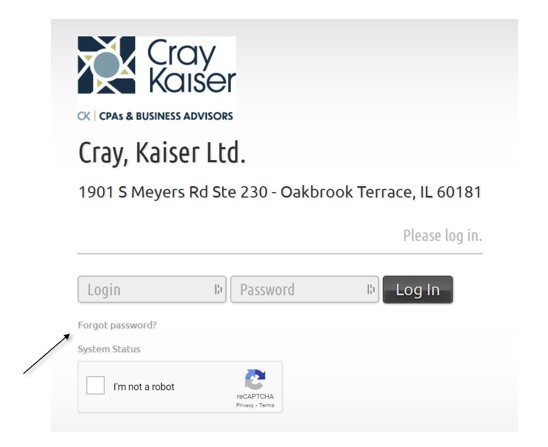
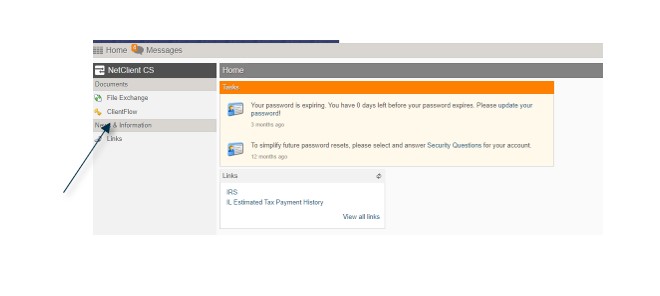
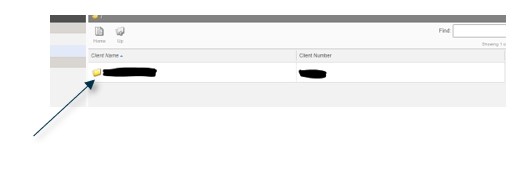
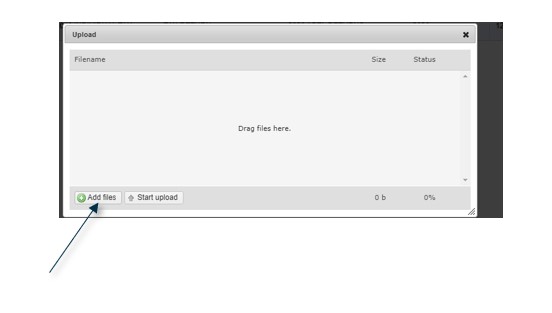
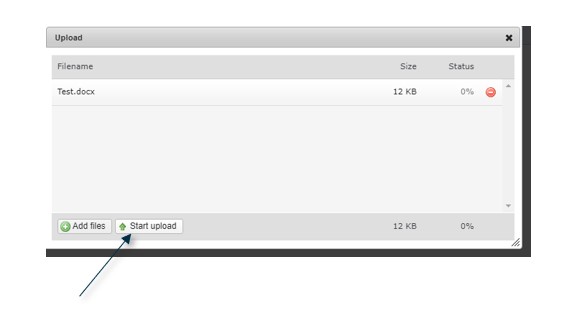

We hope these instructions help you to navigate our online portal. However, if you still have questions or issues, please don’t hesitate to contact us at 630.953.4900.
As we dive into gathering documents for this year’s tax prep, now is the perfect time to re-organize your business and/or personal files. Below are some ‘general’ record retention guidelines to help you sort through your piles of papers. The IRS requires every taxpayer to keep adequate records and make them available upon request. If you fail to keep adequate records, the IRS may disallow deductions and access a penalty so sort wisely!
While purging, keep in mind identifying information can often be found on those accounting and legal documents you will want to discard, such as name, birth date, address and social security numbers. Any confidential or personal items you plan to toss should be SHREDDED to safeguard your privacy and identity.
First, take a records inventory and place items in broad categories (for example: operations, accounting, tax, and legal). Then each year moving forward you can apply documents in the categories consistently. By taking the time now to index and archive documents, you won’t need to guess which of the 10 boxes has the one document you are looking for in the future. Especially because we all know it will be in the last box you look! Again, make sure to SHRED all documents that exceed your retention policy.
The following general guidelines can help you develop your own retention timeline policy.
Keep indefinitely:
Keep seven years:
Keep three years:
Keep indefinitely:
Keep ten years:
Keep seven years:
If you need additional help deciding which records to keep and which to toss, give us a call at (630) 953- 4900.
When multiple business entities make a decision to start a new business together as a cooperative arrangement, they are creating what is known as a joint venture. In forming a joint venture, each of the involved entities agrees to what assets they will contribute, how they are going to distribute income and share expenses, and how the new entity will move forward.
Even though a joint venture represents a cooperative between two or more business entities, each of those original entities retains its original legal status, whether as companies or corporations or as an individual or group of individuals. Not all joint ventures involve the actual formation of a new business entity, but if a new entity is created it will be required to pay its own taxes. The tax liability will be based on the form of business that is adopted: if an unincorporated joint venture, the tax on profits will belong to the entities who originally joined the agreement, while as a corporation it will have its own tax responsibility.
A joint venture can exist solely as an agreement between the original cooperating entities. Whatever form a joint venture takes, it is best arranged via a detailed, comprehensive contract that specifies the assets each participating entities will contribute, how the new entity will be managed, who will be in control of important decisions, and how the distribution of profits and losses will be accomplished.
There are numerous advantages to forming a joint venture, including combining distinct talent and background from two separate entities to create a novel product or service, or taking advantage of one entity’s strength in marketing with another’s innovation. A good example of a successful joint venture can be found in BMW Brilliance Automotive, Ltd, which was formed between BMW Group and Brilliance China Automotive Holdings. The two companies created a new entity to sell BMW vehicles in China, leveraging Brilliance China’s geographic presence to sell BMW’s products.
Among the reasons for forming a joint venture are:
Though many joint ventures are formed with an eye to the future, some are created to accomplish short-term goals and then quickly disband upon those goals being achieved.
A joint venture can take the shape of any type of business entity, including a partnership or corporation. Whatever type of entity the founding entities land upon, decisions need to be made regarding division of stock if a corporation, who will be on the board of directors, and how much responsibility for the new entity’s management each original entity will carry.
In some cases, a joint venture is established under a unique federal income tax arrangement called a qualified joint venture that allowed a married couple greater simplicity in filing their joint return than they would find if a business that they operate together were to be established as a partnership.
Though similar, a consortium is not the same as a joint venture, as it is a more casual business arrangement that does not involve the creation of a new entity. Rather, in a consortium, distinct entities remain separate but make the decision to cooperate.
Though it is conceivable that multiple entities would be willing to enter a joint venture on a casual basis or via an oral agreement (and there’s no legal requirement that a joint venture register with a state or federal government), it’s still better to involve an attorney who can craft a document requiring the signatures of all parties involved. A well-formulated joint venture agreement may include:
Once a joint venture is formed, there are additional tax considerations that may come into play. If you have any questions about forming a joint venture or a joint venture that you are already involved in, please contact Cray Kaiser.
Owning and operating a small business can be both exciting and stressful. When it comes to financial statements, there is a lot of information at your disposal, so much so that you can easily suffer from “analysis paralysis” if you don’t understand what your financial metrics are trying to tell you or how they can be used to implement change.
In today’s fast-paced world, it is incredibly important to not only have timely financial information to make management decisions, but to also have relevant financial information. Knowing which numbers are most important to your business, the financial ratios applicable and beneficial to your business, and how to interpret that data to make well-timed and impactful decisions is vital to your success. Below we detail 10 of the most important financial metrics and how to leverage them.
Nobody understands your business like you; however, it’s equally important to understand your industry. Are you staying up to date on issues, technology, regulations, etc. that impact your industry? If not, look into industry publications that have this information readily available. There are also numerous online resources for industry financial data and benchmarks, which is valuable in comparing the metrics discussed in this blog to your peers. For example, your business may have a quick ratio (see #6) of 1.00, which is technically considered “acceptable”. However, your peers may have a quick ratio of 1.20 which may be indicative that you have some adjustments to make.
Cash flow is the most telling metric of all since cash is the lifeblood of any company. This financial metric demonstrates your cash inflows and outflows and helps identify any potential issues in your business. If you’re not keeping an eye on your cash flow you could find yourself caught by surprise when it comes to collection issues or making essential payments to vendors or paying off debt.
This metric is the number of times your receivables have turned over, or collected, for a given period. The higher the number, the more times the receivables have been converted to cash during that period. Conversely, the lower the number, the less frequently accounts receivable is being collected and may suggest collection issues. As many businesses fluctuate during the year due to business seasonality, it is often best to compute this metric using average receivable balances rather than using a “snapshot” balance, which can produce misleading results.
Similar to sales to receivables, day’s receivables express the average number of days that receivables are outstanding. The greater the number of days, the greater the probability of delinquencies in accounts receivable as this represents how quickly your sales are converted to cash from the date of the sale to when it hits your bank account.
The aging schedule within your accounting software is a standard report. This information is compiled and calculated based on the dates in which your sales/receivables are entered into the system and lays out the aging of your customer receivables in “buckets”. Typically, these buckets are “Current”, “31-60 days”, “61-90 days” and “90+ days”. This metric helps you identify not only potential collection issues, but the customer or balance that is delinquent. Further, it can also help you determine if there are any errors in your accounts receivable balance. For example, does it make sense that your customer is paying their current receivables but not the balance that is 91+ days outstanding? It might be an invoice that was overlooked or an accounting error.
Current ratio and quick ratio are listed together because they both show your business’ ability to service its current obligations. The difference is that the current ratio considers all current assets and the quick ratio only utilizes the business’ most liquid current assets, such as cash and accounts receivable. You want both ratios to be greater than 1.00.
Have you created a budget and then compared it to your actual activity? Budgets should be created based on experiences and trends, as well as any known future occurrences (i.e. planned asset acquisitions or annual pay raises). If you compare what you’ve budgeted to what you’ve actually spent, it will give you a far better sense of whether you’re staying on track and what kind of adjustments you need to make.
No matter how well you are doing, there is always a chance that you will encounter an unforeseen circumstance that will drive the need to cut costs. The best way to prepare for this is to take a close look at your fixed charges and compare them to your Earnings Before Interest, Taxes, and Depreciation – known as EBITDA. This ratio shows how many times your company’s earnings can cover its fixed expenses such as leases, rent, debt, etc. This is extremely valuable in assessing whether you may be overextended, or it can help determine if any loan, lease, or contract that you sign may overextend your business. Furthermore, banks will often calculate this ratio when determining whether to lend you money.
This is similar to the fixed charge coverage, with the difference being that debt obligations are assessed with the business’ net operating income rather than EBITDA. If this ratio is greater than 1.00, the business is well equipped with profits to cover debt payments. If the coverage ratio is less than 1.00, the business has not generated sufficient income to cover its debt obligations. This ratio is particularly important because banks will often require this to be at a certain level, which may be greater than 1.00, as a condition of their loan. Expect your lender to monitor this ratio on an ongoing basis during the terms of the loan.
It’s important to know and understand your working capital not only from a financial standpoint, but also from a regulatory or compliance standpoint. Working capital assesses your business’ ability to pay its current liabilities with its current assets, which gives you an indication of your business’ short-term health. Depending on your industry, you may be required to keep a minimum working capital amount or follow any covenants outlined in your business’ loan agreement. In addition, it can also help you determine if you have too much cash on hand and/or if you’re not effectively putting your cash to work by re-investing in the business to facilitate growth (i.e. with asset acquisitions, technology upgrades, or other capital expenditures). For example, if you have approximately $1 million in current assets but only $100,000 in short-term liabilities (including short-term debt), you may have approximately $900,000 that you can re-invest in your business.
Each of these financial metrics are extremely beneficial in helping you understand the performance of your business. However, this list is not comprehensive; there are many more metrics that are vital to understand.
All businesses are different and operate in different industries and often have different objectives and external influences. If you would like to discuss these financial metrics or how Cray Kaiser can help you, please contact us today.
Many taxpayers rent out their first or second homes without considering tax consequences. Even if you rent out your property using rental agents or online rental services that match property owners with prospective renters (i.e. Airbnb, VRBO, HomeAway), it is still your responsibility to properly report the rental income and expenses on your tax return. You should be aware of some special tax rules for renting your home that probably apply to you.
When a property is rented for fewer than 15 days during the tax year, the rental income is not reportable, and the expenses associated with that rental are not deductible. Interest and property taxes are not prorated, and the full amounts of the qualified mortgage interest and property taxes are reported as itemized deductions (as usual) on the taxpayer’s Schedule A.
Rentals are generally passive activities, which means that losses from these activities are generally only deductible up to the amount of gains from other passive activities. However, an activity is not treated as a rental if either of these statements applies:
If the activity is not treated as a rental, then it will be treated as a trade or business, and the income and expenses, including prorated mortgage interest and real property taxes, will be reported on Schedule C.
If the personal services provided are similar to those that generally are provided in connection with long-term rentals of high-grade commercial or residential real property (such as public area cleaning and trash collection), and if the rental also includes maid and linen services that cost less than 10% of the rental fee, then the personal services are neither significant nor extraordinary for the purposes of the 30-day rule.
The tax rules for renting your home can be complicated. Please call Cray Kaiser at 630-953-4900 to determine how they apply to your particular circumstances and what actions you can take to minimize tax liability and tax maximize benefits from your rental activities.
Please note that this blog is based on tax laws effective in December 2020, and may not contain later amendments. Please contact Cray Kaiser for most recent information.
Please note that this blog is based on laws effective in September 2020 and may not contain later amendments. Please contact Cray Kaiser for the most recent information.
Regardless of the type of business you’re running, it’s safe to say that you’ve likely already been impacted by the ongoing COVID-19 pandemic. With no complete end to the situation in sight, many have begun to try to settle into whatever this “new normal” actually is. This, of course, presents its own fair share of challenges. Once you get your doors opened back up again, if they’re not already, you may start to think about other important events down the line: valuations and appraisals, risk assessments, and succession planning.
Thanks in no small part to COVID-19, many private enterprises and family-owned businesses have been forced to dramatically rethink their points of view on these strategies and other important wealth transition and succession planning topics. As a result, below are some things to take into consideration.
One of the more unfortunate impacts that COVID-19 has had in the last few months involves a decrease in small business values across the board. The fact that both actual and expected revenues and earnings have likely decreased for many organizations, coupled with an increase in interest-bearing debt and liquidity issues in the market at large, all have a lot to do with this issue.
At the same time, it is entirely possible to mitigate risk to that end by keeping a few key things in mind. First and foremost, focus your attention on cash flows, the cost of capital, and growth as much as possible. One of the most critical considerations for a proper business valuation in these times involves figuring out what a recovery from COVID-19 will look like for your organization.
Obviously, certain industries have bounced back faster than others. Likewise, there are certain things that we just cannot know right now – like when a vaccine will be available and what effect that will have on the world. But you can focus on a few key areas – like whether you will experience a full recovery or only a partial recovery, and how long that impact will last – to make better determinations about projected cash flow and other growth-related factors.
On the plus side, all of this represents a unique opportunity for many people to take advantage of low small business valuations to minimize things like estate and gift taxes. Lower business valuations allow business owners like yourself to transfer a greater portion of your business assets and reduce your taxable estate. So, from that perspective, you’ll be able to gift assets against your lifetime exemption that would have previously been considered a taxable event had COVID-19 not occurred at all.
In general, you need to remember that the major goals of wealth transition and succession planning are that you’re attempting to preserve as much of your wealth AND your business as possible. Yes, it’s about making a plan that you can follow over time. But it’s also about being flexible enough to evolve that plan as conditions can (and likely will) change.
This is true for COVID-19’s impact on the supply chain. Even if your small business isn’t being directly impacted right now, the same might not be true of your supply chain partners or even your largest customers. This could have a considerable impact on your own operations, and if your organization is particularly vulnerable to these types of issues, you need to start thinking about ways to mitigate them as soon as you can.
Likewise, you may be one of the lucky few businesses that wasn’t actually negatively impacted by COVID-19 at all. Some industries are absolutely thriving right now – with manufacturers of personal safety gear and even a lot of food and beverage manufacturers being among them. If this describes your situation, it’s likely that you’ve seen a short-term increase in sales and, in all likelihood, profitability. How will this impact the future of your organization? Is this what the “new normal” looks like for you, or will you eventually return to pre-COVID levels? Do you have a way to determine this right now, or is time going to have to tell the story? These are all critical questions that you need to try to answer to make the best possible decisions in terms of succession planning.
In the end, understand that wealth transition and succession planning were always complicated processes, and COVID-19 has not done anyone any favors. No matter what, you need to recognize that this is an inherently specific process. So much is impacted by your own unique circumstances and the facts surrounding your organization. Likewise, your end goals will play an important role in the decisions you make, along with how they may have changed in the last few months.
However, if you’re able to keep these core best practices in mind and look at things through this new pandemic lens, you’ll be able to create the right plan for your objectives with as few potential downsides as possible. If you’d like to discuss wealth transition and succession planning strategies for your business, please contact Cray Kaiser. We’d be happy to help you.
Please note that this blog is based on laws effective in August 2020 and may not contain later amendments. Please contact Cray Kaiser for most recent information.
The rules surrounding the sale of one’s principal residence have changed over the years. It used to be that you could simply rollover your gain on a tax-free basis as long as you reinvested the proceeds into a new principal residence. However, those gain on home sale rules have since been eliminated and replaced with a principal residence exclusion. Here’s how it works:
Individuals who use and own their home as a principal residence for at least 2 out of the last 5 years before sale can exclude a portion of the gain from tax. This rule is regardless of prior sale gains that have been rolled over. Those who meet the 2-out-of-5-year use and ownership tests can exclude up to $250,000 ($500,000 if both filer and spouse qualify) of gain from the sale of their home, and generally don’t need to keep a record of improvements made to the home.
But what happens when you don’t meet the exclusion rules? Here are some situations that could lead to a taxable gain on the sale of your home:
In these cases, it is important to keep home improvement records in order to substantiate a reduced gain. We understand that keeping records can sometimes feel like a burden. But, consider the alternative. For every dollar of improvements that you cannot substantiate, you will recognize a higher capital gain on the sale of your home. As a result, you will be subject to the capital gains tax. Additionally, there is a good chance your overall tax rate will be higher than normal simply because the gain pushed you into a higher tax bracket. Before deciding not to keep records, carefully consider the potential of having a gain in excess of the exclusion amount.
You’re likely wondering which records to keep. We don’t recommend keeping the receipt for every can of paint purchased or ripped screen replaced, as these wouldn’t be eligible as improvements. However, you should file away receipts, invoices, contracts, etc., and cancelled checks, credit card receipts or bank records to prove payments when you make improvements such as adding a room, putting on a new roof, or remodeling the bathroom.
If you have questions related to the gain on home sale rules or questions about how keeping home improvement records might directly affect you, please contact Cray Kaiser today.
Please note that this blog is based on laws effective on June 22, 2020 and may not contain later amendments. Please contact Cray Kaiser for most recent information.
When businesses hear about the research tax credit, they typically imagine that it’s for scientists in white lab coats. But that is not the case! The credit is actually much broader and more valuable than you might think.
The tax credit of up to 20% of qualified expenditures encourages businesses to develop, design or improve products, processes, techniques, formulas or software and similar activities. In the past, this credit—called the Credit for Increasing Research Activities—had to be reauthorized by Congress annually, but as part of the 2015 PATH Act, this credit was made permanent.
Calculated on the basis of increases in research activities and expenditures, the purpose of the research tax credit is to reward businesses that pursue innovation by continually increasing investment in research activities. Even so, an alternative simplified method allows taxpayers to claim research credits if research costs remain the same or even decline compared with prior years.
There are two methods used to compute the credit: the regular method that provides for a 20% research credit or the simplified method which is easier to document but results in a reduced credit of 14% of eligible expenses.
• Regular Method – Under the regular research credit method, the credit equals 20% of qualified research expenditures for a tax year over a base amount established by the business entity in 1984–1988, or a later period for companies that started subsequent to that period of time. This method may be the best choice for companies that can document a low base amount.
• Simplified Method – Under the alternative simplified method, the credit equals 14% of qualified research expenses over 50% of the average annual qualified research expenses in the three preceding tax years. If the taxpayer has no qualified research expenses in any of the three preceding tax years, the alternative simplified method credit may be 6% of the tax year’s qualified research expenses. This method may be the best choice for taxpayers with incomplete records from the mid-1980s, those complicated by mergers and acquisitions, taxpayers with a high base amount from that period or smaller business entities.
The term “qualified research” means research undertaken for the purpose of discovering information that is technological in nature, the application of which is intended to be useful in the development of a new or improved business component of the taxpayer, and relates to:
However, certain purposes that are not qualified include style, taste, cosmetic or seasonal design factors. The definition is relatively broad and encompasses such activities as:
The research tax credit is considered part of a taxpayer’s general business credit. A general business credit may typically be carried back one year by filing a refund claim for that earlier year, and if not used in that prior year, it is carried forward for a maximum of 20 years. This credit will not normally offset the alternative minimum tax. However, eligible small businesses with $50 million or less in gross receipts may claim the credit against their alternative minimum tax liability.
The business expense that created the credit must be reduced by the amount of the credit.
In the case of a qualified small business (one with gross receipts of less than $5 million) the business may elect to claim a portion of its research credit, not to exceed $250,000, against the employer’s share of the employees’ FICA withholding requirement (the 6.2% payroll tax). To be eligible for the payroll tax credit, the business may not have had gross receipts in any tax year preceding the five-tax-year period that ends with the tax year of the election.
If you would like to further discuss the research tax credit and how it might benefit your business, please contact Cray Kaiser today.
